

Confirm the link and grant Standard access
As soon as we've added your account, two things need doing in your Merchant Center. Only after that do your Shopping ads run through our CSS and can we read your product data.
Step 1: Confirm the link request
A link request from us is waiting in your Merchant Center. Confirm it.
Step 2: Grant Standard access
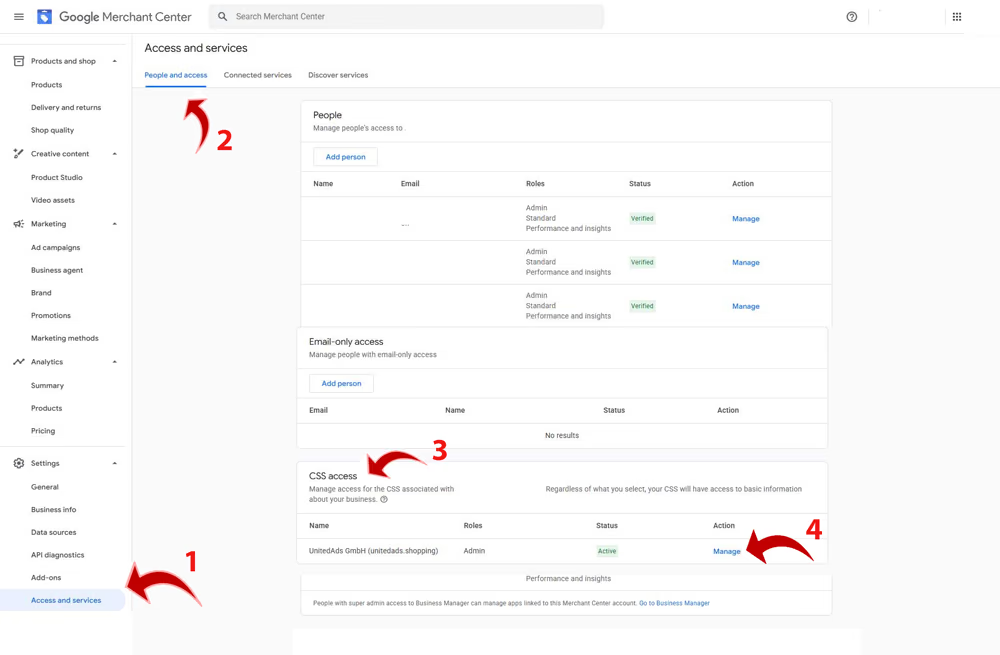
Our CSS is listed under CSS access. Click Manage there and choose the role Standard. Without this role, Google refuses us your product data, and we can't show your products in our price comparison.
Google notifies the account's administrators by email. Where this area sits in Merchant Center depends on the version of your interface: currently under Settings → Access and services → People and access → CSS access; Google's help still describes the older path Settings → General → Account setup → Comparison Shopping Services.
If you can't find the request
- Check your permissions. The confirmation needs administrator rights on the Merchant Center account. You can see who has them in user management.
- Check the account. Are you signed in to the account whose number you sent us? If you have several accounts, this is the most common cause.
- Is a switch already under way? If your account is currently within the waiting period of another CSS switch, Google won't accept a new request. In that case we wait until the period has expired.
- Ask us. We can see whether the request has gone out and, if in doubt, send it again.
If access can't be granted
Google currently has a known caching issue in this area of Merchant Center. If granting access doesn't work straight away, this small detour usually helps:
- 1Go to People (arrows 1 and 2 in the screenshot: Settings → Access and services → People and access).
- 2Select any person and click Manage.
- 3Don't change anything there.
- 4Go back to CSS access (arrow 3).
- 5Click Manage there again (arrow 4).
- 6You should now be able to grant the Standard CSS Access.
If you're switching to us from another CSS provider, a waiting period follows the confirmation — see Switching from another CSS provider.