

How Online Shops Use the New Aggregator Units to Boost Their Reach
The Digital Markets Act (DMA) is fundamentally changing Google Search in the European Economic Area (EEA). With the new CSS aggregator units, Google now strictly separates results into two areas: on one side pure comparison shopping services (CSS), on the other direct merchant offers.
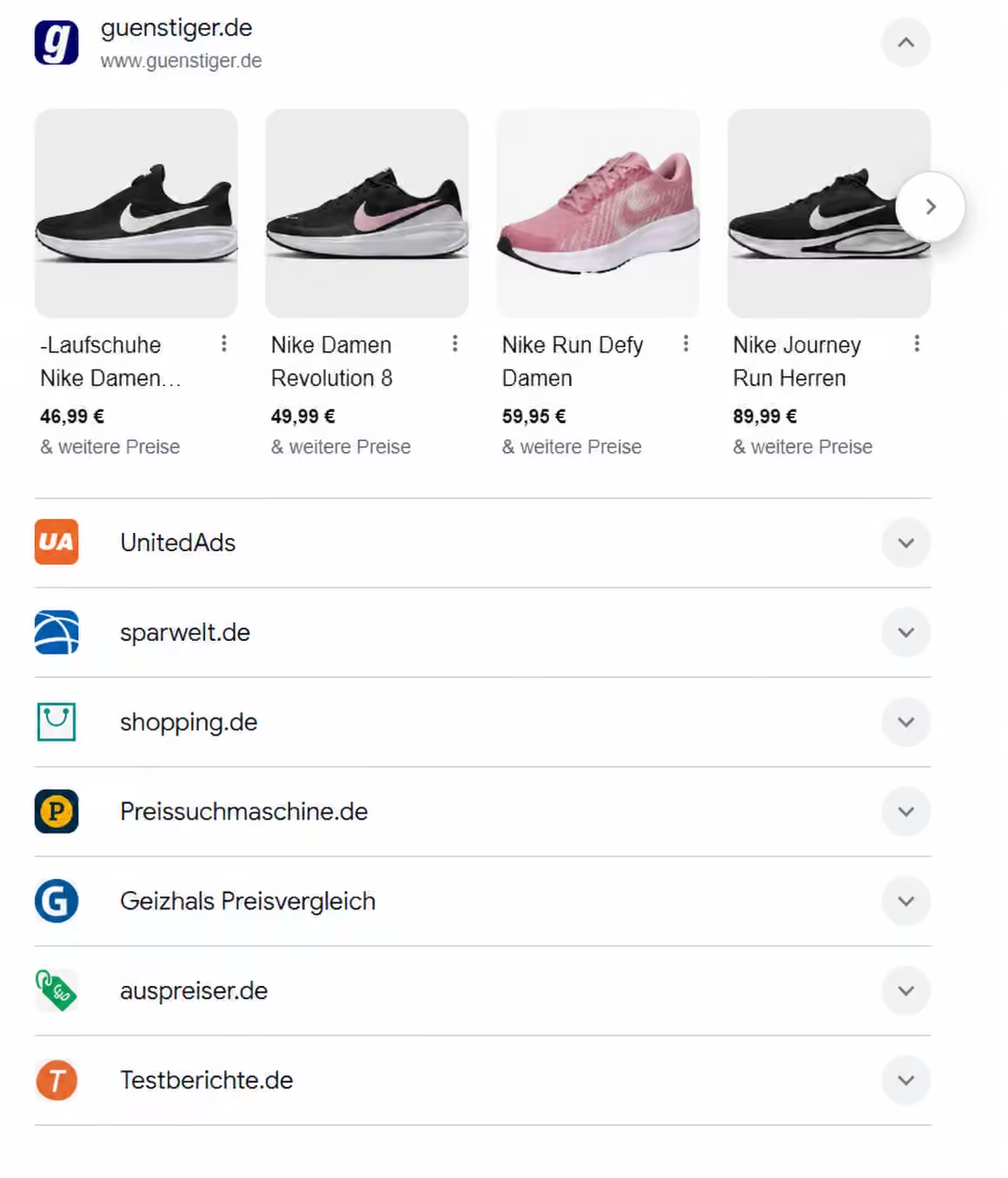
Many e-commerce businesses are worried: direct product ads slip into the separate merchant section, while generic searches (“men's running shoes”, “bean-to-cup coffee machine”) are increasingly dominated by the prominent aggregator boxes. If you rely solely on the standard Google Merchant Center, you risk handing valuable visibility and traffic over to third-party portals.
Key Takeaways
- Comparison shopping services now have their own rows: Organic Shopping results in the EEA are an expandable list of providers. The only way into those rows is through a comparison shopping service (CSS).
- The format is not settled yet: The European Commission has not yet published a final assessment of whether the change complies with the DMA.
- There is nothing for you to build: Google sets no markup or new feed requirement for retailers to appear in the unit.
- Your CSS has a say in where you appear: Which row your products sit in depends on which comparison shopping services list them and submit them to Google.
What Google Has Actually Changed
Google calls it the aggregator unit. According to Google's documentation, it is a multi-provider search feature shown to users in the EEA: several comparison services show their own results inside one block.
For product searches, that means:
- Organic Shopping results are presented as rows, one per comparison shopping service.
- Only one row is open at a time, showing that provider's product tiles, prices and links.
- The top-ranked provider's row is expanded by default; the others sit in a list behind it.
- Google shows direct providers in a separate unit alongside, the supplier unit. It only appears together with the aggregator unit.
Two things don't change. Paid Shopping ads keep running as before. And the unit isn't limited to products – Google uses the same format for hotels, flights, long-distance trains and buses and local businesses, with comparison shopping services being the product case.
Why It Happened
In July 2026 the European Commission ruled that Google unlawfully favours its own services in Search. The basis is Article 6(5) of the Digital Markets Act, which stops a gatekeeper from favouring its own services in its own rankings. Google was given 60 days. Google documented the new units on 8 September 2026 and announced them for the EEA.
The next step followed on 17 and 18 September: Google removed free product listings and the "popular products" carousel from Search in the EEA.
The format isn't final. The European Commission has not yet published a final assessment of whether the change complies with the DMA, and comparison shopping services have already taken their objections to the Commission. So the layout may still change.
Which Comparison Service Shows Your Products Matters More
This is the part that matters commercially. Before, organic Shopping listings sat in one grid. Now they sit in rows, each belonging to a comparison shopping service. One row is open by default, the rest are behind a click.
Your products appear in a comparison shopping service's row when that service lists them on its comparison site and submits them to Google. That makes choosing your CSS more than a question of click price: it's also about which row your products sit in, and whether shoppers see that row without opening anything.
Google doesn't disclose how providers are ordered. It points to what is most helpful for the search and to its Search Quality Rater guidelines. There is no published formula – anyone promising you one is guessing.
A Channel You Can't Reach on Your Own
The rows aren't simply a new place where your existing listings turn up. They are provider rows, and the only route into one is a comparison shopping service.
Google's documentation is explicit: to supply results into the unit, a business has to be approved by Google as a vertical search service. For product searches, those are comparison shopping services. There is no route of your own for an individual retailer, no form of your own to fill in and nothing to buy.
For the aggregator unit's rows, working with a CSS is therefore your only access. Google can additionally show direct providers in the separate supplier unit.
There Is Nothing for You to Build
Many retailers ask what they need to implement now. The answer: nothing.
Google's documentation sets out no structured data requirement, no schema markup and no new feed specification for retailers to appear in the aggregator unit. The comparison shopping service supplies the data by submitting its product pages to Google. You don't need to add anything to your product pages or your feed for this.
If someone offers you an aggregator unit implementation project, ask exactly what they intend to implement.
What Nobody Knows Yet
Being straight about the limits of what is known matters more here than sounding certain.
Observations from individual markets are snapshots, not trends. The European Commission hasn't yet confirmed whether the redesign satisfies its ruling, so the format could change again. And the performance figures circulating right now come from individual providers reporting on their own traffic, over days rather than quarters. Treat them accordingly.
What is not in doubt is the structural change: comparison shopping services are no longer invisible plumbing behind a grid but the named rows that organic Shopping results are organised into.
From Traffic Loss to a Double Presence
Changes in the Google ecosystem aren't a threat so much as a battle over distribution. Instead of seeing comparison shopping services as pure competition, forward-thinking merchants use them as strategic traffic distributors. This is exactly where csspartner.io comes in, turning the new market rules into your competitive advantage:
- Maximum coverage through Multi-CSS: With csspartner.io you stay present in the classic merchant area and at the same time secure placements in the newly highlighted aggregator units.
- 20 % lower click costs or 25 % more bidding power: When you advertise through a CSS, Google's 20 % margin on the cost per click (CPC) no longer applies. You pay 20 % less for the same click or bid 25 % more with the same budget – that means more reach at the same cost.
- Automated feed monitoring: Daily checks of your product data prevent missing approvals in Merchant Center and keeps your items eligible to serve in all formats.
- Optional click fraud protection: Available as a bookable add-on, it filters out bots and invalid clicks before they drain your ad budget.
- Zero downtime when switching: Your campaigns, history and bids keep running without interruption. The connection is made simply via an invitation in Merchant Center.
Reclaiming the Customer Journey
The clear separation between merchants and aggregators calls for flexible ad sets. If you switch to a hybrid CSS strategy early, you secure the top spots in the buyer's decision process – long before the competition catches up.
- Free Google CSS migration
- Full visibility in Google Shopping
- 20% lower click prices
- Visibility in free listings
- 21 EU markets included
- Premium email support
- Cancel anytime